General
Added Your Business to Google Maps but It Is Not Showing? Five Things to Check
You added the shop to Google, but cannot find it when you search. Where should you start?
Creating a Business Profile, obtaining management access and appearing prominently for a service search are different stages. A problem at one stage does not automatically tell you what is happening at the others.
Here are five areas to check when a business is not appearing as expected on Google Maps, with practical next steps for each.
First, Separate a Missing Listing from a Low Ranking
Try the exact business and location before diagnosing a ranking problem.
- Search for the business name and city in Google Maps, checking that it is the correct branch.
- Search Google for the business name plus location while also checking the account that should have management access.
A profile that appears by name but not near the top for a broad category search has a different problem from a suspended or inaccessible listing. The five checks below are starting points, not an exhaustive diagnosis.
Check 1: Verification or Review Is Still Outstanding
What May Be Happening
Entering the business details does not complete owner verification. Check whether the actual profile asks for verification, further evidence or another action. Verification supports authorized management and publication of business information, but an existing unclaimed public listing can also be present; do not assume every unverified place is absent from Maps.
What to Do Next
- Open Google Business Profile through the appropriate account.
- Read the verification status and any notices on the actual business.
- Complete an offered method if required. Options can include recorded or live video, phone, email or mail; Google determines availability.
Google says most mailed codes arrive within 14 days, followed by the applicable review process. Verification review can take up to five business days and occasionally longer. The original five-to-fourteen-day mail estimate and 72-hour display limit should not be treated as one universal deadline.
Check 2: Important Information Is Missing or Inaccurate
What May Be Happening
Complete, accurate information helps Google and customers understand the business. That is different from a published “100% complete” score required for visibility or a guarantee that each filled field improves ranking.
What to Do Next
Check the relevant details below. Some features and public fields are optional or vary by business.
| Detail | What to check |
|---|---|
| Business name | Use the real-world name customers recognize from signage and branding. |
| Category | Choose the most accurate primary category and only relevant additional categories; two or three secondary categories are not mandatory. |
| Address | Use the correct address and unit information, or the appropriate service-area setup if customers do not visit the operating address. |
| Phone | Use a suitable business-controlled number where provided. |
| Hours | Keep regular and special hours accurate. |
| Website | Add the relevant business website if you have one. It is not required to begin; social and booking links have their own supported fields. |
| Description | Explain the real business within the 750-character limit, without unrelated keywords or links. |
| Photos | Show the real entrance, interior and representative products. Five useful images can be a starter collection, not a ranking threshold. |
The original photo figures have a historical source: Google’s July 2016 article, citing December 2014 Google/Oxera research, reported 42% more direction requests and 35% more clicks for listings with photos. They do not establish current Korean CTR, causation or completed visits.
Check 3: The Category Does Not Describe the Business Well
What May Be Happening
Categories help describe what the business does and can affect local ranking. They work alongside other factors, rather than being the single rule that determines every search match.
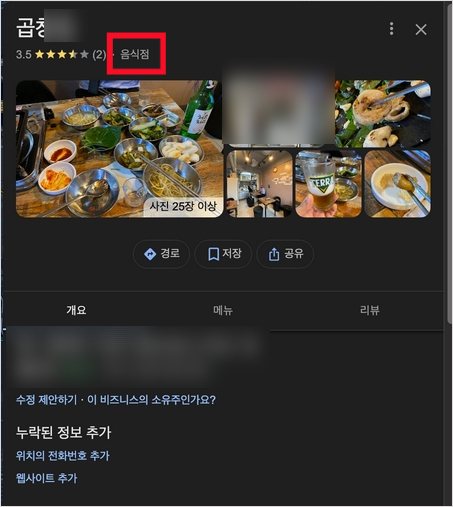
Example: the broad “Restaurant” category highlighted on a Korean Google profile.
The original article discussed a gopchang restaurant using only a broad restaurant category. The useful question is whether the available category accurately describes the actual business, not whether a different label will automatically produce a particular position.
Two Common Examples
- A pasta-focused restaurant using only a broad restaurant category may have a more specific accurate choice available. That does not prove it is excluded from every pasta search.
- A nail salon categorized as a hair salon should check the available category that actually describes its core service.
What to Do Next
- Open the profile’s available Edit profile and category controls.
- Choose the category that best describes the main business, such as an Italian restaurant where that option is available and accurate.
- Add other categories only where they genuinely apply. Do not add a pasta or pizza category simply to cover extra keywords.
Choose from Google’s available categories; you cannot create a custom one. If the exact category is missing, use the closest accurate option. A category change may require verification again.
Check 4: The Address or Map Pin Is Incorrect
What May Be Happening
The address and pin may not identify the real business location accurately, particularly in a new building or a larger complex.
Distance is part of local ranking, but there is no fixed rule that a pin a few hundred meters away always excludes a business from every “near me” search. Correct it so customers can reach the right place.
What to Do Next
- Open the available location or business-address controls for the correct profile.
- Check the real address and map position, including how someone reaches the entrance.
- If the pin is wrong, use the appropriate adjustment and save process, then check the edit status. Avoid repeatedly changing accurate information merely to try to influence ranking.
Include the correct floor, suite or unit where it is part of the business address. It helps customers find an indoor location; it is not a separate promise of improved nearby-search placement.
Check 5: The Profile or a Recent Change Is Still Being Processed
What May Be Happening
A newly created or edited profile can require processing. That is different from a guaranteed waiting period before Google will allow a business to compete in local results.
How to Interpret the Original Timeline
| Observation point from the original article | What to check rather than assume |
|---|---|
| Immediately after registration | Check verification, listing and edit status. A new pin and very low ranking are not universal automatic outcomes. |
| One to two weeks | Check exact-name discovery and notices. This is not a guaranteed date on which name searches begin working. |
| One to three months | Review relevant discovery measures and customer actions. Category rankings do not automatically rise through this period. |
| After three months | Continue checking information and actual performance. Posting or review volume does not activate a guaranteed new ranking stage. |
Google’s current find-your-business guide says new-business rankings can take up to a month to appear and describes some search updates taking up to three days. Its separate edit guide says edits usually take about ten minutes to review but sometimes up to 30 days. These describe different processes, not one universal maximum covering verification, approval, public display and ranking. Follow the status and instructions relevant to the actual issue.
Useful Work While You Check the Status
- Prepare a worthwhile post when there is real news. A weekly schedule is an operating suggestion.
- Keep representative photos current as the business changes.
- Offer genuine customers a neutral, optional review route, without incentives, screening for positive feedback or requested wording.
- Check actual hours, menu information and other important details, while avoiding changes that would interrupt an active verification step.
Ongoing management helps keep the information useful. Google does not publish a guaranteed ranking boost simply for a regular pattern of posts, uploads or owner replies.
Three Further Checks if the Issue Remains
If the first five areas do not explain the problem, check the current status and the identity of the listing carefully.
- Possible duplicates: identify whether two listings describe the same business and follow the appropriate ownership or duplicate process. Separate legitimate businesses can share an address; do not delete or merge another listing merely because the address matches.
- Policy notices: an inaccurate keyword-stuffed name, fake reviews or another violation can result in restrictions. Check any actual suspension or account notice and follow the relevant correction or appeal route.
- Changes from other information sources: Google may update details using reports or other data. Review notifications and correct inaccurate information through the proper process.
A Checklist for the Next Useful Step
- Is verification complete, or is a specific next action shown?
- Are the relevant details accurate, without treating optional fields as a universal completeness threshold?
- Does the category describe the real core business?
- Does the address and pin identify the correct location?
- What does the actual review status say? Do not use two weeks as an automatic deadline for every process.
- Have you identified a genuine duplicate, rather than a separate business at the same address?
- Does the public name match the real business without extra promotional keywords?
Use the checklist to choose the next action that matches your profile’s status. These checks do not establish the cause of every missing listing or guarantee a particular search result.
The original article includes a Google profile setup video (Korean).
Start with the Actual Status
Check whether the issue is access, verification, a pending edit, policy restriction or local ranking. They can require different responses.
Work through the most relevant of the five checks and keep the information accurate. If the status indicates a problem you cannot resolve, use the appropriate support route rather than repeatedly opening new listings or changing correct details.
If you would like help understanding what to check first, contact BlinkAd.
English edition checked October 31, 2026. References: Google’s find-your-business guidance, verification, edit review, categories, addresses and pins, local ranking, and representation guidelines. The original illustrative screenshot is retained with an English description. No new client audit, map scan, account change, listing edit or verification action was performed.